









Frequently Asked Questions
Can’t find any answer for your question?
Ask our
Customer Support
Educational Student User licensing is available to Education Users (students) using their school email address for use in specific coursework, thesis, design competition or research while attending a Qualified Educational Institutions as defined in the RISA Educational Licensing - Program Description and Additional Terms.
Once a request is made, access to RISA software products is per semester with licensing being reset on December 31st and July 15th each year. New requests can be made each semester.
Educational Student User licensing is available to any active student using their school provided email address. If you previously had a trial license, you can complete the form above to request student licensing for the remainder of the semester.
With the switch to student licensing (from a previous trial) you may need to clear the RISA login credentials on your computer. Follow these steps to complete the process:
1. Navigate to "C:\ProgramData\RISA".
2. The ProgramData folder is a hidden folder, typically. If you do not see it, please go to View and check the box to show Hidden Items.
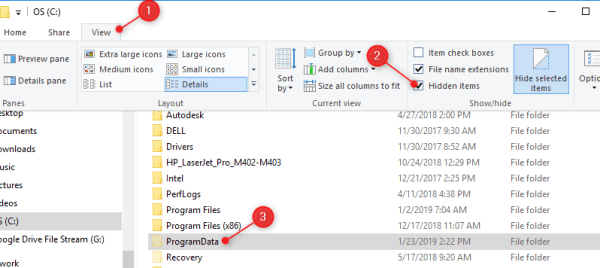
3. In that folder is an additional folder that will be named with the current users username on the computer. The example shown below is for a username of "gabriellec" (just for reference). That folder contains the cached credentials. Delete that folder.
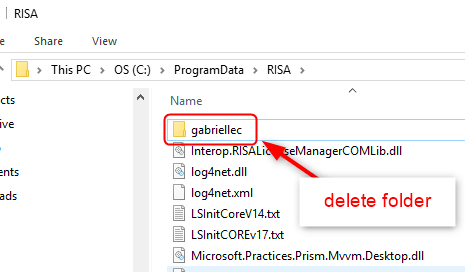
When you delete that folder, the next time you launch a RISA product it will prompt you for the username and password. Once you successfully log back in, it will regenerate those cached credentials with the correct info and that error go away.
Please note, you may also need to restart your computer after completing the steps above.
RISA programs are Windows-based and require a Windows operating system to run. Although RISA software does not operate natively on macOS, it is compatible with virtual machines that run Windows OS on your Mac. Below are the steps to get RISA up and running smoothly:
Step 1: Update Your macOS
Ensure your Mac is running the latest version of macOS for the best compatibility with virtualization software.
Step 2: Install Virtualization Software
You will need to install virtualization software to run Windows on your Mac.
Some of the most common options include:
- Parallels Desktop for Mac (Recommended and tested)
- VMware Fusion
- VirtualBox (Free option, but not tested with RISA)
Follow the manufacturer’s instructions for installation.
Step 3: Install Microsoft Windows
Once your virtual machine is ready, purchase and install a licensed copy of Microsoft Windows. Windows 10 or Windows 11 (64-bit) are recommended for optimal performance.
Step 4: Download RISA Software
RISA software is now available exclusively through subscription-based licensing. You can download the latest versions of RISA programs directly from the RISA Customer Portal:
- Go to the RISA Customer Portal.
- Log in using your RISA Customer Portal email and password.
- Navigate to the Downloads section.
- Select the RISA product you want to install and download the installer.
Step 5: Install RISA Software
Run the installer inside your Windows virtual machine and follow the prompts to complete the installation. All licensing is handled through your subscription and verified online.
Using RISA on an iPad
One interesting note about using Parallels Desktop for Mac, is if you also own an iOS device, such as an iPad or iPhone, you get Parallels Mobile from the App Store and control your virtual computers from an iOS device. Now you have RISA on an iPad!
Note: When using a virtual computer, we recommend using as much virtual RAM as you have available. For additional support, please contact RISA technical support
Training resources are available in the RISA Learning Center. Resources include free step-by-step tutorials as well as paid virtual courses. Purchasing paid courses requires use of a non-EDU email address. Additional videos and technical articles are also available to help answer your specific questions.